Before the beginning of jQuery
Before the beginning of jQuery and lots of other stuff, there was the HTTP Protocol. Guess what, the HTTP protocol barely evolved since its beginning. If you don't understand the HTTP protocol you're pretty doomed if you want to do high quality web development. But the bright side is, it never changes...
Forget about the formal definitions of the HTTP protocol in Wikipedia, here's what you got to know: The HTTP protocol is composed of client and servers where clients are making requests to servers to get content from it:
 As you can see clients are only requesting files to the server and the servers are only serving content to clients.
There's nothing complicated here and there's no particular technology involved either. In fact, whether the client is a web browser or a telnet session, the server couldn't care less. On the other side, if the server is running Apache, the client doesn't care either. AS LONG AS BOTH ARE FOLLOWING THE HTTP PROTOCOL.
It's the separation between the two (what's going through the wires in the middle of the previous picture) that makes the whole thing transparent and working since 1990 even thought the technologies used on clients and servers evolved (Browsers versions, Coldfusion, ASP, PHP, Perl, etc).
How browsers internally represents the HTML content
We can now toss the server portion out of the way since it only serves content. Let's focus our attention to a specific type of client, the browser.
As we saw earlier, the browser only request some content from the server and process it:
As human we usually represents concepts with something readable by us like text and symbols and HTML is only another example: we represent web pages with a markup language (HTML). But for machines, parsing text can be a tedious task. To be more efficient, browsers are parsing HTML pages only once after receiving the response from the server. They then transform the text representation of the web page into a data structure in the form of a tree called the DOM (document object model). That way they can also validate the document and have a more flexible rendering engine.

A very very important thing to know is that if the source document contains logical errors (The HTML document is not standard compliant), nobody knows how the DOM will be constructed. Internet Explorer will react differently than Chrome when encountering errors because the standard doesn't define error handling guidelines. Afterwards, you could have surprises using JavaScript or jQuery to manipulate the DOM as it may be different from one browser to another.
As a side note, when you do a "view page source" in your favorite browser, it only shows you the original text it downloaded from the server earlier and not what's in memory! That's why if you've manipulated the DOM with JavaScript and then do a "view source" you won't see the changes. But more on that later.
Dynamically changing the page's content (DOM)
It's possible to manipulate the DOM with a client side language called JavaScript. JavaScript can manipulate the properties and the elements of the DOM as soon as the page is loading and afterwards on events triggered by the user. The source of the image could be changed for example:

Sounds good isn't it? No. The problem is that JavaScript functions and capabilities are implemented differently across browsers vendors. For example, a function to do something could be named differently in two different browsers. How can that be? This is another story.. but for now, your scripts must take this into account and it can be a real pain.
A Special case with AJAX
Before hitting jQuery, I feel that now is the proper time to talk about AJAX. AJAX is nothing more than a standard HTTP request made to the server (see above, first image). AJAX doesn't bend the rules. It obeys to the same laws of the HTTP protocol. But normally, when the browser navigates to another page (or image, or text file), the current one is wiped out from memory and visually cleared to give its place to the new one we're navigating to. In AJAX, nothing is cleared out from memory and the current page stays there. That's the only difference. So, with AJAX, you can fetch new content from the server without losing the current DOM. The content retrieved is passed to the document as a JavaScript variable. You can then insert this new content into the DOM or do whatever it please you. So you see, there is almost no difference excepted: this is not the browser window that is handling the new content, this is you in JavaScript. That being said, let's finally look at jQuery.
Where jQuery is sitting in the big picture
To ease JavaScript development, several JavaScript libraries were created to encapsulate the native JavaScript functions and have a more uniform programming environment. That's also the case for jQuery. So we have all the knowledge now to know that jQuery is layer of abstraction above the native JavaScript functions of the browser:
 When I see this, two things comes to mind:
- jQuery can't do more things than JavaScript can actually do... right? Right. I know, it's a shocker.
-and-
- Where the hell "jquery sqlserver out of memory" can be coming from?
The same thing applies to "mvc and google map = jquery". You can now understand that basic key concepts have been mixed up or never truly understood by those googlers. But fortunately, now you know why! (or already knew and thinking the pace of this article is horribly slow)
jQuery And Other Libraries
So jQuery provide a more uniform and easier way to manipulate the DOM. But nothing prevent you to access DOM elements yourself using natives JavaScript functions at the same time. Another amusing kind of keywords I encounter on my site is keywords like "jquery and google maps". People want to use jQuery everywhere, even with perfectly independent JavaScript libraries like Google Maps. That makes no sense. Again, I think it's just a misunderstanding. Independent libraries are not encapsulated by other independent libraries... they sit next to each other:

Sure sometimes a function in jQuery could be helpful in another context, but that's different than trying to do everything in jQuery. It makes little sense to try to encapsulate a library that already encapsulates your native JavaScript functions.
jQuery Architecture
jQuery seems complicated at first but lets write ourselves a little library first and then look at the real deal. Our library will have two functions, a regular function to get a DOM element, and another static function to add two numbers:
function myLibrary(id) {
    return document.getElementById(id);
}

myLibrary.Add = function(a, b) {
    return a + b;};
var myDiv = myLibrary('div1');
var sum = myLibrary.Add(1, 3);
We're pretty happy about our library but the function name is pretty long. What if we create an alias of the main function to make it shorter. Let's take the dollar sign ('$') which is nothing more in JavaScript than a 27th letter in the alphabet. The dollar sign is also more distinctive and less prone to name clashes:
var $ = myLibrary;      // let's make an alias of our library
var myDiv = $('div1');  // do the same as usual
var sum = $.Add(1, 3);
That's great! And guess what, with my previous examples you saw how jQuery was constructed (roughly). This is basically the same thing. If you were shy about the strange nature of the library, you should now be more comfortable with it.
To prove that jQuery is like our little library, here's something you can try. The jQuery's library defines a "jQuery" function and the dollar sign is an alias to it:
alert(jQuery);       // shows a function
alert($ == jQuery);  // shows true
There's two main parts in the jQuery's library (like ours), a selector function "$()" and static functions (called utility functions) "$.Xyz". You can see an examples of both in the next snippet (actual jQuery code):
var myDiv = $('#div1');
var trimmed = $.trim('  hello world ');
Selecting and Manipulating Elements with jQuery Selectors
Maybe you noticed a little difference between our library and jQuery. The parameter to the function that selects DOM elements are different:
var myLibDiv = myLibrary('div1');
var jQueryDiv = jQuery('#div1');
This is because jQuery is very flexible with the way you can select DOM elements with the jQuery selector function. You can query the DOM with other properties than object ids. Inspired by the CSS syntax, jQuery actually offer many ways to match objects in a document:
jQuery('#id');        // Match objects by id
jQuery('.class');     // Match objects by CSS class
jQuery('#id1, #id2'); // Match objects having id1 or id2
[...]
See Selectors in the jQuery documentation to learn many other ways to match and retrieve DOM elements from a document.There's another difference between our library and jQuery. Our library can only find one element at a time (by its id) while jQuery can match multiple elements in a single selector function call:
// returns a single element having the id 'mainTitle'
var title = myLibrary('mainTitle');
// returns every element having the class 'title'
var titles = jQuery('.title');
As opposed to our little library, what is returned by the jQuery selector function is not the real DOM objects. They are encapsulated by another jQuery object. So if we take this example again:
var myvar = jQuery('.title');
Visually, it would appear like this:
So what are the benefits? Remember that every JavaScript implementations across browsers are a little different. If the jQuery selector were to return DOM objects, it would have little value as you would have to manipulate those objects just like before. After all, what's the purpose of selecting objects without manipulating them. And jQuery provide a standard way across browsers to do just that and this is where the real power of jQuery sits:
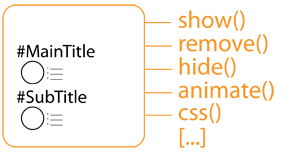
That's it, the jQuery object returned provide manipulation functions that acts on every DOM objects found! Here's an example that would hide every object with the class 'title':
var myvar = $('.title');
myvar.hide();
// Hint, the last two lines could be simplified as
$('.title').hide();
To know every function that you can apply on matched objects, please refer to the jQuery API documentation online.One last thing before closing on this section. Each and every function like the 'hide' function we used previously are also returning a jQuery object containing the DOM elements just like the main jQuery selector function.This is really powerful:
// return a jQuery object containing DOM elements
var myvar = $('.title');
// returns also a jQuery object containing our DOM elements
var myvar2 = myvar.hide();
// same here
var myvar3 = myvar2.height(200);
// same here
var myvar4 = myvar3.show();
// Hint, the last lines could be simplified as
$('.title').hide().height(200).show();
The above snippet, even though pretty pointless, hides every titles to set their height to 200px before showing them again. The succession of function calls is called (no pun intended) chaining.I guess you now have what it takes to fully understand jQuery selectors and manipulators. Let's move on to utilities functions.
jQuery utility functions
If you remember, our little library had a static 'Add' function:
myLibrary.Add = function(a, b) {
    return a + b;};
var sum = myLibrary.Add(1, 3);
Just like that, jQuery provides a lot of useful functions to further encapsulate the native JavaScript functions of the browsers. Here's an example (we already saw the 'trim' function):
$.get('/index.html', function(data) {
    alert(data);
});
The 'get' function is making an ajax request to retrieve asynchronously some content from the server.
